
Main Menu
- Welcome to WebDev.
It's mod time.


Recent posts
#71
EhPortal Support / Re: Error with 1.40.3
Last post by Dave - April 13, 2026, 02:45:27 AMYes I tried to download and all I got was index.php
#72
EhPortal Support / Re: Error with 1.40.3
Last post by deansmar - April 13, 2026, 02:22:30 AMgood to hear that it was a small fix..
tryed to download, all i get is an empty index.php file..

tryed to download, all i get is an empty index.php file..
#73
EhPortal Support / Re: Error with 1.40.3
Last post by Chen Zhen - April 12, 2026, 10:37:38 PMThis was a small fix.
I don't usually make RC or Beta versions available to the general public but for now I'm making it available in the Download section under the EhPortal header.
Members can download the RC version from that page (not guests).
#74
EhPortal Support / Re: Bug report – Image resize ...
Last post by Chen Zhen - April 12, 2026, 10:25:37 PMI ran some tests based on what you described and don't see any issues.
With the scenario shown above, the image appears in the news block.
At the moment, I am not able to reproduce what was reported.
- Installed Orangeline-214 and switched to it
- Created a post with img bbc at its onset
- Created a news block on the front page that displays posts from that board
- Enabled resize images setting
With the scenario shown above, the image appears in the news block.
At the moment, I am not able to reproduce what was reported.
#75
EhPortal Support / Re: Bug report – Image resize ...
Last post by Chen Zhen - April 12, 2026, 10:06:45 PMHello,
Is this happening on custom HTML blocks and pages or also on the included prefab blocks?
#76
EhPortal Support / Re: Bug report – Image resize ...
Last post by deansmar - April 12, 2026, 02:05:34 PMHi,
i am also on SMF 2.1.7 with Portal 1.40.3
on the themes that i use, i do not see this problem..!
i am also on SMF 2.1.7 with Portal 1.40.3
on the themes that i use, i do not see this problem..!
#77
EhPortal Support / Bug report – Image resize issu...
Last post by candidosa2 - April 12, 2026, 03:07:22 AM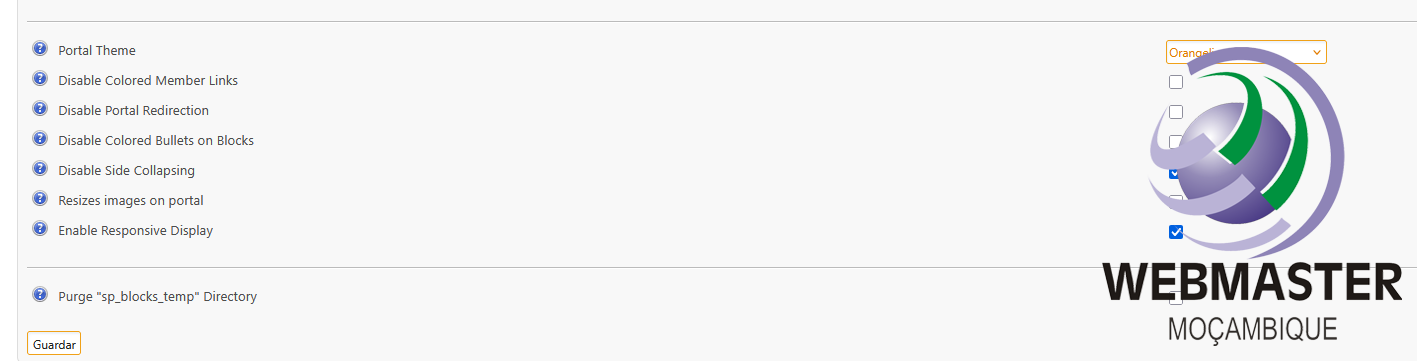
Hello Support Team,
I hope you are doing well.
I would like to report a bug related to image display when using the portal.
Environment details:
SMF version: 2.1.7
Portal: EhPortal 1.40.3
Theme: Orangeline 2.1.4
Issue description:
When I activate the option "Resize images on portal", images stop displaying on the portal pages. The image space appears empty, even though the image is correctly loaded in the HTML (e.g., <img class="bbc_img" ...> is present).
When I disable this option, the images display normally again.
Additional notes:
The issue seems to be related to CSS or how the resize function is applied to images within the portal blocks.
I have tested basic CSS fixes (e.g., max-width: 100%; height: auto;) but the problem persists.
This only happens on the portal (EhPortal), not inside forum posts.
Could you please investigate this issue or advise on a fix or workaround?
If needed, I can provide screenshots or access for further testing.
Thank you in advance for your support.
Best regards,
#78
EhPortal Support / Re: Error with 1.40.3
Last post by Dave - April 10, 2026, 05:34:18 AMThanks Chen
#79
EhPortal Support / Re: Error with 1.40.3
Last post by Chen Zhen - April 10, 2026, 05:28:07 AMYes, I will look into it this weekend.
#80
EhPortal Support / Re: Error with 1.40.3
Last post by deansmar - April 09, 2026, 04:01:06 PMYes the 1.40.0 does not have this problem..
The 1.40.0 has the problem with the javascript login..
which was solved with the 1.40.3 version..
Let's hope that all the bugs disappear with the next version..
Chen mentioned that he would probably work on it over the weekend
The 1.40.0 has the problem with the javascript login..
which was solved with the 1.40.3 version..
Let's hope that all the bugs disappear with the next version..
Chen mentioned that he would probably work on it over the weekend